How I (Mostly) Automated Pinterest Pins
Let's make Claude do all the hard work!
Motivation
As my continued unemployment stretches on, I'm looking for ways to up the monetization of my review blog. I'm actually making a few dollars a month, which is, by definition, not nothing. Is it covering server costs? No. But that's why I'm trying to increase it. One way of increasing monetization to increase the volume of people who actually end up reading the content.
One source of new readers for my content that has supposedly worked wonders for other bloggers is Pinterest. Pinterest is kind of social media, but also functions more as a visual search engine. If you're not familiar with the website, you essentially post photos to boards and then other people can share (pin) those photos to their own boards. If you have a good pin, it's a good way to get evergreen sources of traffic, as the more times its pinned or interacted with, the more times Pinterest will surface it to others, starting a positive feedback loop.
Did you know that it's recommended to post multiple pins a day to Pinterest if you want to attempt to gain a foothold in the network? Not recycled reposts either - brand new content, multiple times a day.
Who has time for that, you ask. Well, no one. Or, at least, not me. I like writing and creating but really despise coming up with the keyword laden blurbs that are necessary for SEO and Pinterest. Especially not at the volume of multiple times a day. But luckily, we live in the time of AI, where the creation of keyword slop can be offloaded to a virtual personality that has done nothing but train on keyword slop.
Using Claude as a Rubber Duck
So, using my rough goal of becoming good at Pinterest without breaking my brain over changing phrasing a word at a time, I turned to Claude. Claude is great for spitballing vague ideas and coming up with an action plan. It's like talking to my husband about my problem, but a version of my husband that also knows about SEO, the intricacies of social media platforms and tools, and backend engineering, and also I don't need to bother my actual husband, freeing him to play Slay the Spire 2. Win-win situation to be honest.
After a few turns of brainstorming with Claude, it became clear that my problems with creating Pinterest content don't lie in the image creation itself, but actually creating the hooks to be placed into each image. There are plenty of pin templates on Canva that I can very easily add my own colors, fonts, and photos to, but actually generating a phrase that fits into that exact sentence structure is hard. It's a concept that's a little easier to explain in pictures than in words.
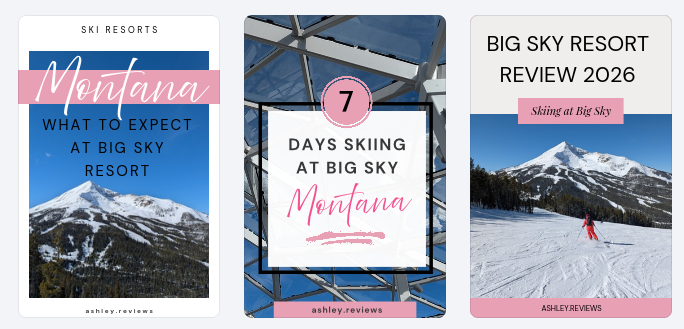
Here, MONTANA is highlighted in two pins, but it's at different points in the phrase, and the third pin doesn't have any word highlighted at all. For whatever reason, it's hard for my brain to adapt an existing title to fit these three distinct formats without it sounding choppy or repetitive.
Based on this knowledge, I directed Claude to read a bunch of screenshots of templates I would like to use and generate phrase structures that fit into those templates as part of a skill. The skill would take my already written blog post as input, and then output everything needed for a Pinterest post featuring the blog content in a table. I could use that table to then create the images and the pins, with the pin phrases already broken down to match the template wording.
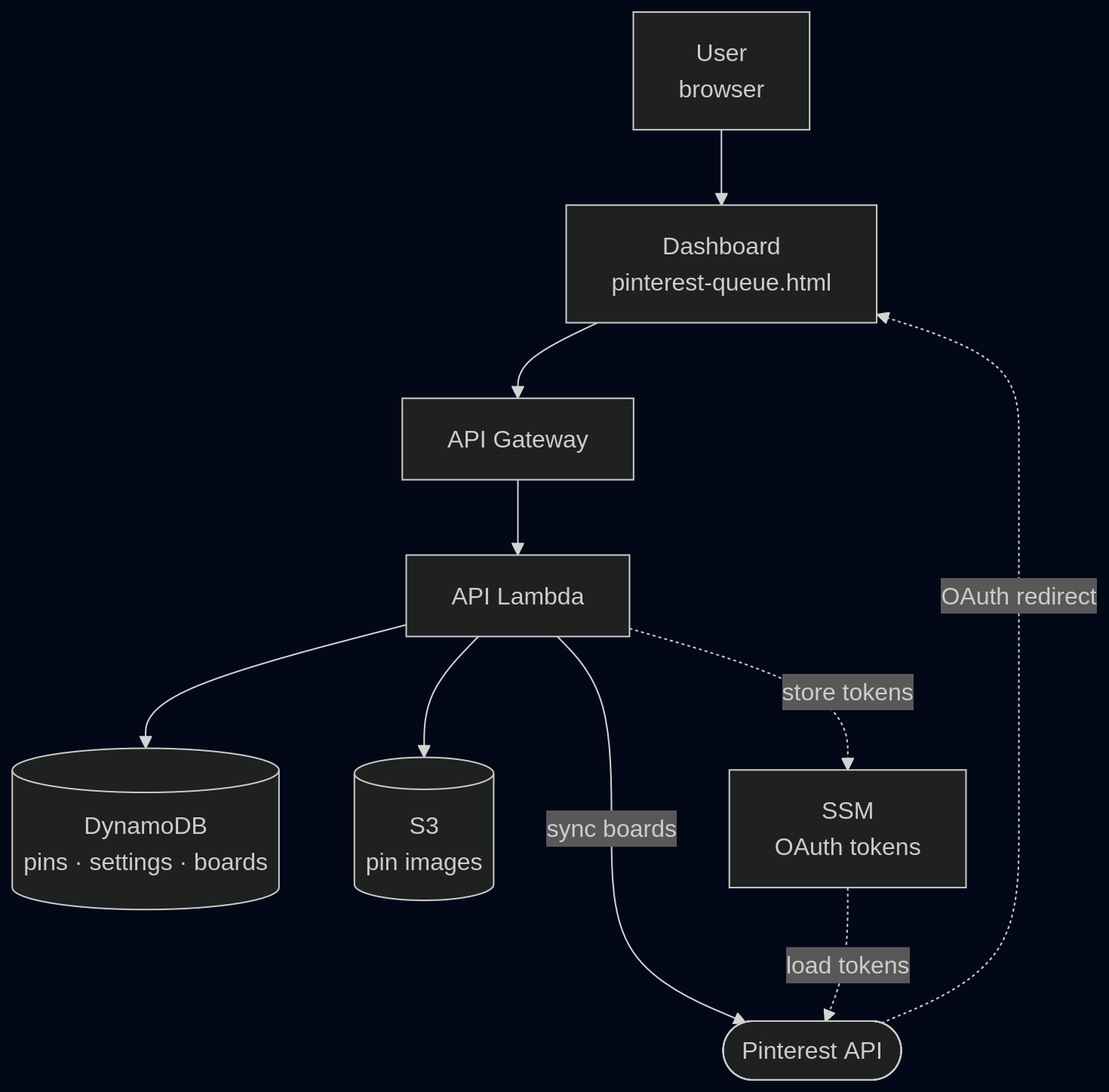
But why stop there? If I could get Claude to write the copy, I might as well get Claude to do the posting for me as well. So, the idea for a simple time-based queue came up. The pins and their metadata would be stored in the cloud and a glorified cron job would post the pin when the time came. The web dashboard would be run locally on my laptop whenever I had anything new to upload, so there was no need for an actual server.
Technical Stuff
After everything, this is what the flow of the whole system looks like:
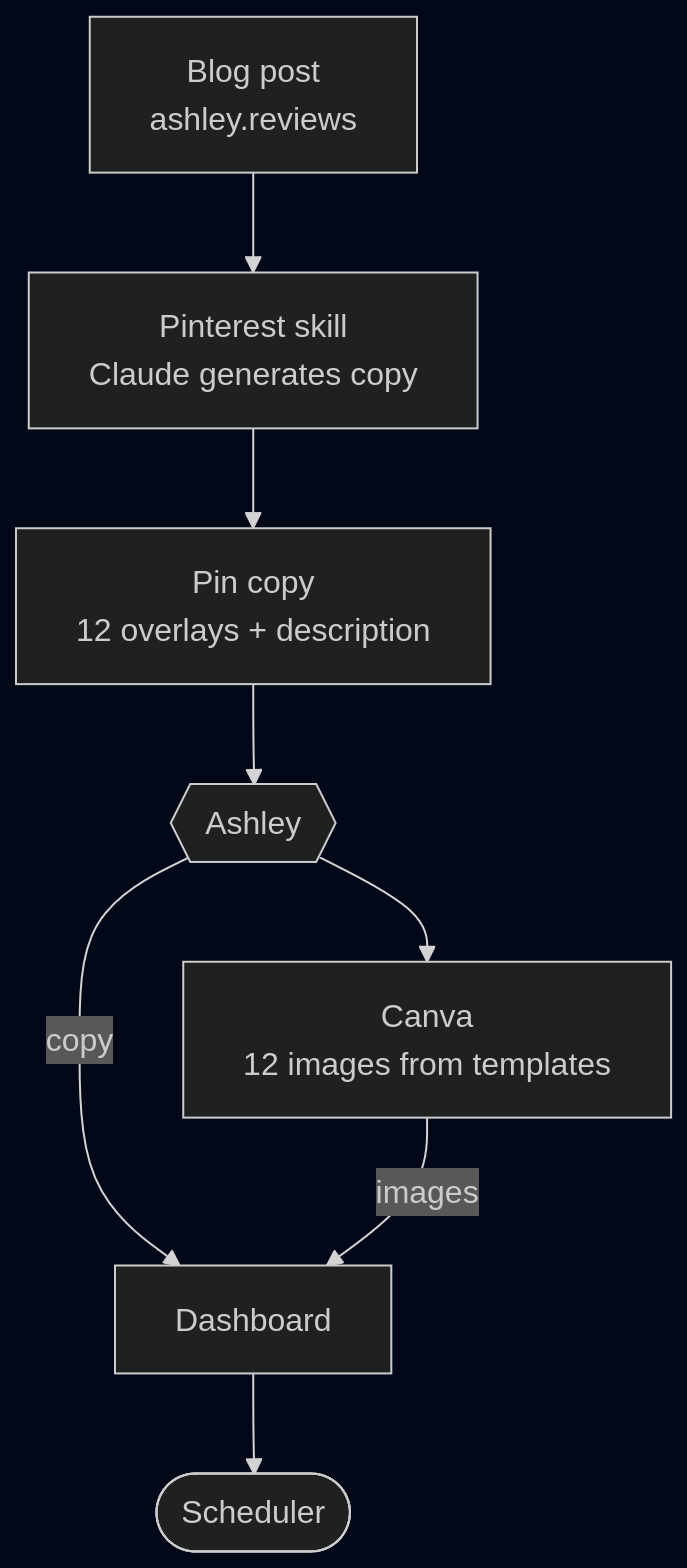
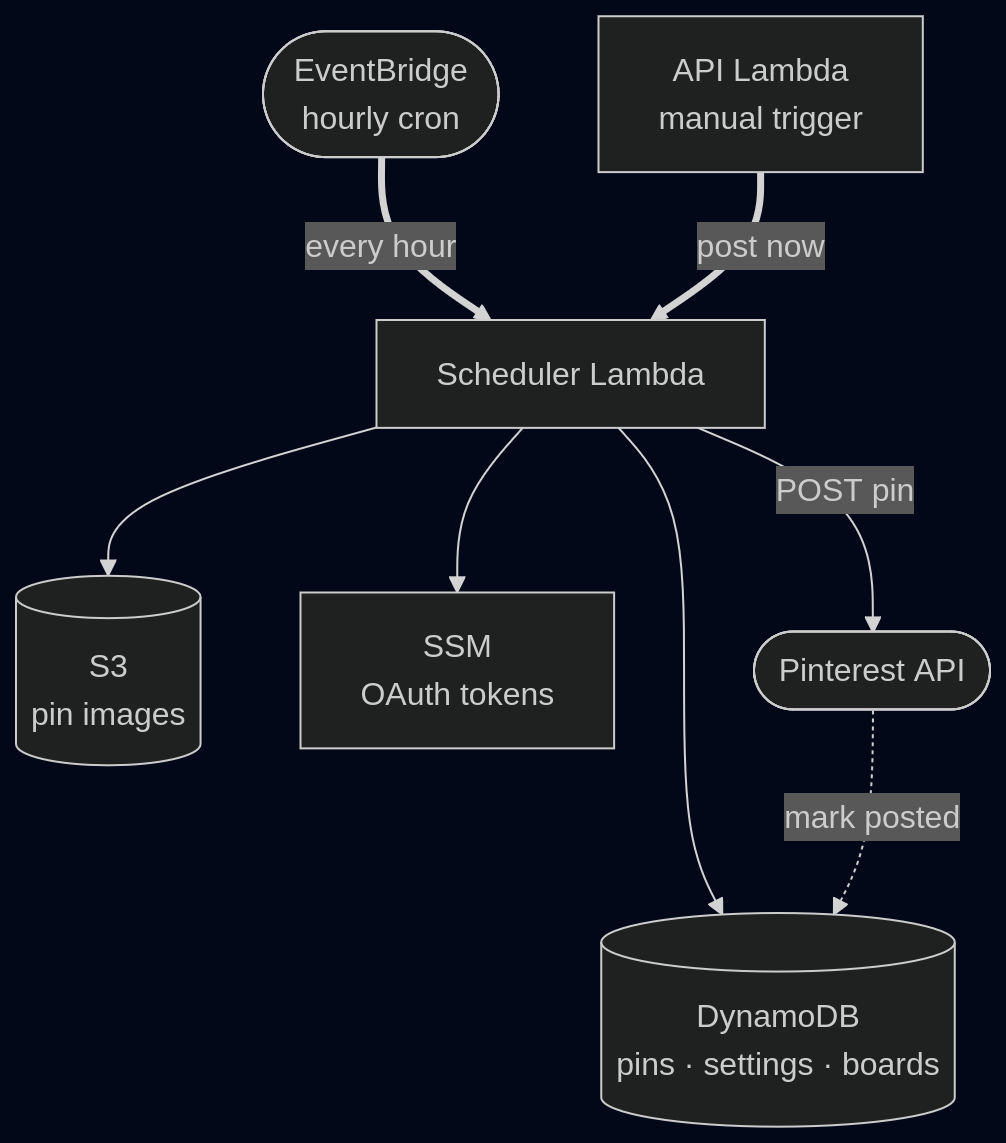
The only manual portion that remains is the creation of the actual image, and transferring the copy output from the Claude skill to the web dashboard. Creating the image is something that I like doing, and I also think the output of existing auto creation tools is terrible. I would much rather spend the time to create an aesthetically pleasing image myself versus rely on a questionable automated system to get it right. Transferring the text of the output is fine because I already have a break in automation to create the images, and this way I also don't need to pay Claude API pricing, and can instead rely on my regular Claude subscription.
The portion I really enjoyed handing off to Claude was the backend. I have an understanding of how the AWS pieces fit together, but I don't have expertise in plumbing it through myself. Claude was able to write everything as infrastructure-as-code, so the deployment and creation of resources is completely automated without me trying to figure out the nuances of AWS or mucking about in the AWS console.
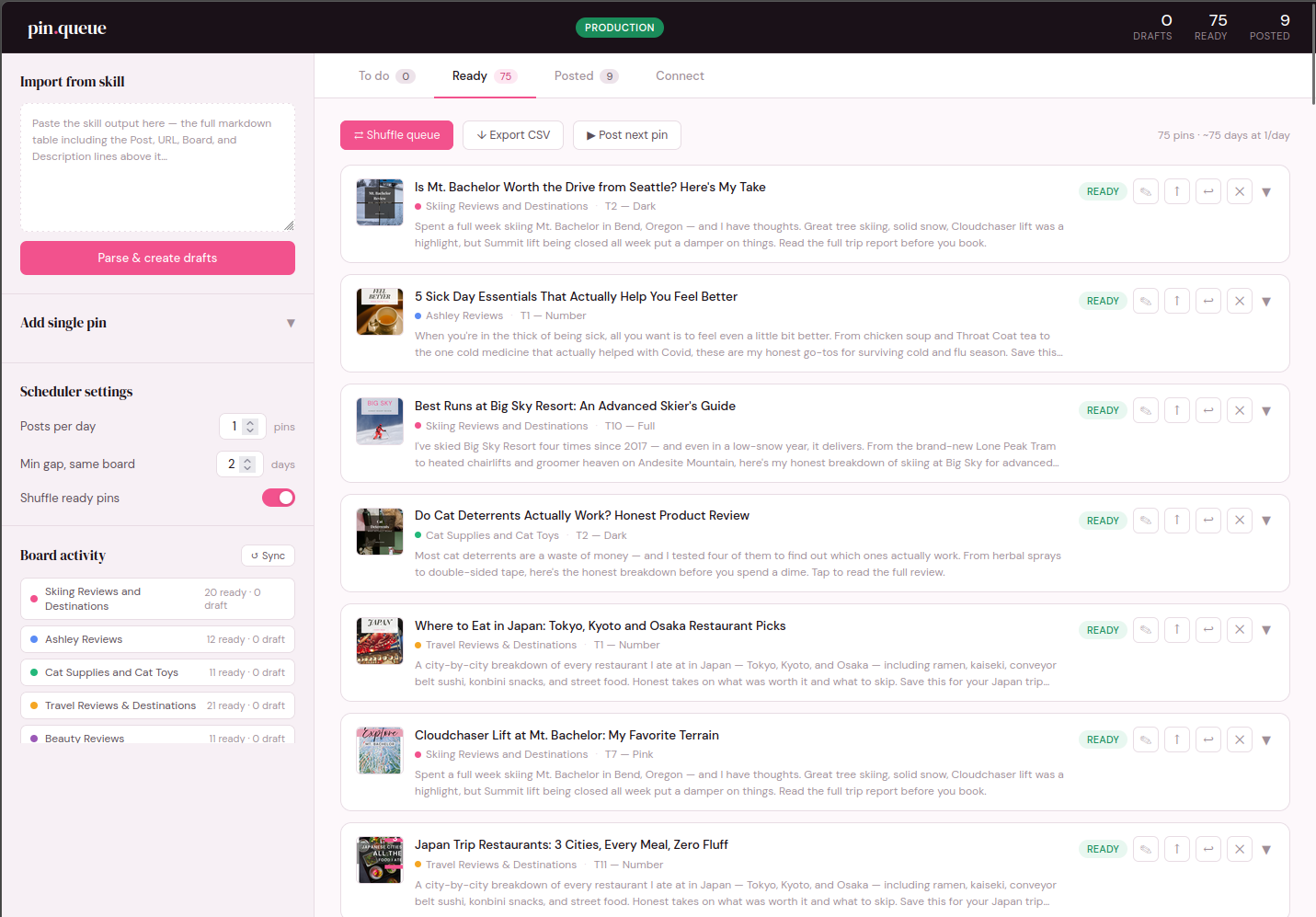
The frontend looks acceptable, especially for something that is really only meant for my eyes. It's technically extremely basic, just an html page served from a local python server. I'm always impressed with how the AI-generated UIs look pretty good on the first pass, and it really only required fixing things that I didn't state as initial requirements.
Results
It's been just over a week since I got the end-to-end running in Pinterest production, so it's still too early to see if this actually ended up increasing traffic to my blog. A brief scan of my Pinterest analytics show that impressions have picked up, but outbound clicks or saves of my pins haven't budged.
My pin creation speed, however, has increased to an insane amount. There's seventy-five pins queued up to be posted, and I'm not even done going through my history of posts. The output of the Claude skill is correct probably about 85% of the time, with the 15% being fixed via telling Claude that the title it generated makes no sense, or sounds dumb, or just fixing grammar myself. This is so much easier and faster than doing it on my own, and allows me to focus on the fun task of sorting through the dumbest stock footage on earth for Pinterest pins vs wrangling SEO wordplay.
I can see this project needing tweaks in the future, as the pin queue is tightly coupled to a specific format of copy from the Claude skill. If I want to make changes to the copy, like add another pin template, I will also need to update the website. But I don't forsee that being an insanely difficult problem to fix if I decide that's what I want. For now, I consider my goal of increasing pin throughput to be a success.